
Before Your Dental Practice Uses AI: A Practical Checklist for Safer Adoption
Apr 25, 2026Before Your Dental Practice Uses AI: A Practical Checklist for Safer Adoption
During a team meeting, a staff member brings up a new AI tool that a vendor demoed at the most recent dental show. Another staff member attended the same presentation and mentions the screenshots of the application showed a polished interface, and that the vendor mentioned it can save hours and how easy it is to use.
That is usually when the dental brain says, "Great. This looks like a “no brainer” similar to when we moved from film to digital X-rays."
Not quite.
AI can absolutely become an excellent tool for dental practices. It can, potentially, help with documentation, communication, scheduling, summaries, education, marketing, image analysis, and administrative workflows. But, adopting AI is not the same as switching from one piece of software to another. The use of AI introduces questions about handling of patient information, vendor controls, data use, staff access, accuracy, accountability, and team education.
The good news: this does not need to be scary. It just requires a deliberate approach to ensure it works safely, correctly and within privacy compliance boundaries. .
What to do before buying any dental AI tool
Before a dental practice uses AI, it should have total clarity on what the tool does, what information it processes, where that information goes, whether patient or practice data may be used to train the system, what agreements are required, who on the team may use it, and what training is required for staff to use it correctly and safely.
That is the difference between experimenting with AI and adopting AI responsibly.
Canadian privacy regulators have reminded organizations adopting generative AI, to use tools that comply with privacy laws and best practices, including how personal information is collected, used, retained, and potentially used for training or operation of the system. [1]
Why AI adoption is different from an ordinary software upgrade
When a dental practice adopts ordinary software, the main questions are often practical:
- Does it work with our systems?
- Does the team like it?
- What does it cost?
- Can we get support?
Those questions still matter with AI. But they are not enough.
AI tools often work by processing prompts, files, images, recordings, transcripts, or other inputs. In a dental practice, those inputs may include patient personal financial and health information, staff personal information, treatment details, financial data, or business and sensitive information.
That means the practice needs to look beyond the shiny demo. A beautiful button can still create a privacy problem, if nobody knows what happens after the button is clicked.
The Canadian Centre for Cyber Security warns that users may unknowingly provide personally identifiable information or sensitive corporate data in AI prompts; and that organizations should be careful about what information they provide to AI tools. [2]
If your practice is already reviewing what to look for before buying cybersecurity education, use the same mindset with AI: look beyond convenience and ask what the tool will touch, who controls it, and what evidence you can keep.
A practical AI adoption checklist for dental practices
This checklist is designed to help you slow down in the right places. It is not meant to replace legal advice, a privacy impact assessment, professional regulatory guidance, or structured team education. It is just a practical starting point.
1. Define the job before choosing the tool
Start by identifying the problem, not the product.
Ask:
- What specific task are we trying to improve?
- Is AI necessary for this task, or would a simpler workflow solve the problem?
- Will the tool be used for clinical, administrative, marketing, HR, or patient communication purposes?
- What could go wrong if the output is incomplete, biased, inaccurate, or misunderstood?
This matters because different AI uses carry different levels of risk. Drafting a first version of a staff meeting agenda is not the same as summarizing patient health information or supporting clinical decision-making. Same alphabet soup, different soup pot.
Privacy regulatory bodies encourage organizations to manage AI risks across the lifecycle of AI systems, including design, deployment, use, and evaluation. [3]
2. Identify what data the tool will touch
Before approving an AI tool, map the information it may process.
Ask:
- Will the tool receive patient names, dates of birth, health history, treatment notes, radiographs, photos, insurance information, payment information, or staff data?
- Can the team use the tool without entering identifiable information?
- Does the tool store prompts, uploads, transcripts, recordings, or outputs?
- Can information be deleted?
- Who can access the history?
A useful rule: if you would not paste the information into a public chat window, do not paste it into an AI tool until the practice has approved the tool and confirmed the presence and efficacy of privacy and security controls.
3. Ask whether your data is used for training
- This is one of the most important vendor questions.
- Ask the vendor:
- Are prompts, files, images, recordings, transcripts, or outputs used to train or improve your model?
- Is training on customer data turned off by default?
- If not, can it be turned off contractually and technically?
- Are there separate settings for administrators and individual users?
- Does the vendor use subcontractors or third-party model providers?
The Office of the Privacy Commissioner of Canada says developers and providers should inform organizations about purposes of a generative AI system, including secondary purposes such as where personal information collected from prompts is used for further training or refining an AI model. [1]
4. Check location, transfer, and access to data
Where the data will reside is important, but it is not the only question.
Ask:
- Where is the data stored?
- Where is it processed?
- Can support staff or subprocessors outside Canada access it?
- What laws may apply in those jurisdictions?
- Does your provincial privacy law, health privacy law, regulator, contract, insurer, or organizational policy impose extra requirements?
Under PIPEDA, the Office of the Privacy Commissioner of Canada states that organizations remain accountable for personal information transferred to third parties for processing,and must use contractual or other means to provide a comparable level of protection. The OPC also says organizations should be transparent when personal information may be processed in another jurisdiction. [4]
So the question is not simply, "Is this allowed in Canada?" The better question is, "Can our practice demonstrate that we assessed the tool, the data flow, the safeguards, the contract, and the patient privacy implications?"
5. Confirm the right agreements are in place
Before using AI with practice or patient information, the practice should know what agreements are required.
Depending on the tool and jurisdiction, this may include: Dentist and practice manager reviewing an AI adoption checklist in a bright dental office.
- Privacy and security terms
- Data processing terms
- Confidentiality terms
- Subcontractor terms
- Breach notification requirements
- Retention and deletion terms
- Professional or regulatory documentation
This is not the most exciting part of AI adoption. It is also not optional. Dental practices already understand consent forms, chart notes, and sterilization logs. Documentation is not glamorous, but it is how a practice proves that important compliance work was done.
6. Decide who may use the tool and for what purpose
AI access should not be a free-for-all.
Ask:
- Which staff roles need access?
- Should all staff have the same permissions?
- Who approves new AI tools?
- Who can upload files?
- Who can connect AI tools to email, calendars, practice management software, cloud storage, or messaging platforms?
- Who reviews outputs before they are used?
Access control matters because risk often increases when tools connect to other systems. A tool that only drafts generic text is one thing. A tool connected to email, calendars, files, patient communications, or clinical records is a completely different thing.
7. Create simple rules for staff use
Your team needs clear guidance before they start experimenting.
A basic AI use policy should answer:
- Which tools are approved?
- Which tools are not approved?
- What information must never be entered?
- What tasks are allowed?
- What tasks are not allowed?
- Who checks AI outputs?
- What should staff do if they accidentally enter sensitive information?
The Canadian Centre for Cyber Security recommends that organizations establish policies on how AI should be used, what content is allowed to be generated, and what oversight and review processes are required. [2]
This is also where the human element matters. AI risk does not only live in a vendor contract. It shows up in everyday team decisions: what gets copied, what gets uploaded, what gets trusted, and what gets sent. For more on that human side, see The Human Element in Dental Cybersecurity.
Recommended education
A checklist helps practice leaders ask better questions. It does not replace practical education for the people who will use AI in real workflows.
For most dental teams, the recommended base education is Myla's AI, privacy and cybersecurity education for dental teams. This gives the team a clearer understanding of what AI tools can and cannot do, what information should not be entered, when outputs need review, and why privacy and cybersecurity still matter when a tool feels helpful.
The goal is not to make every team member a technology expert. The goal is to help people use AI more safely, confidently, and responsibly in the moments that matter.
A simple SAFE way to think about AI
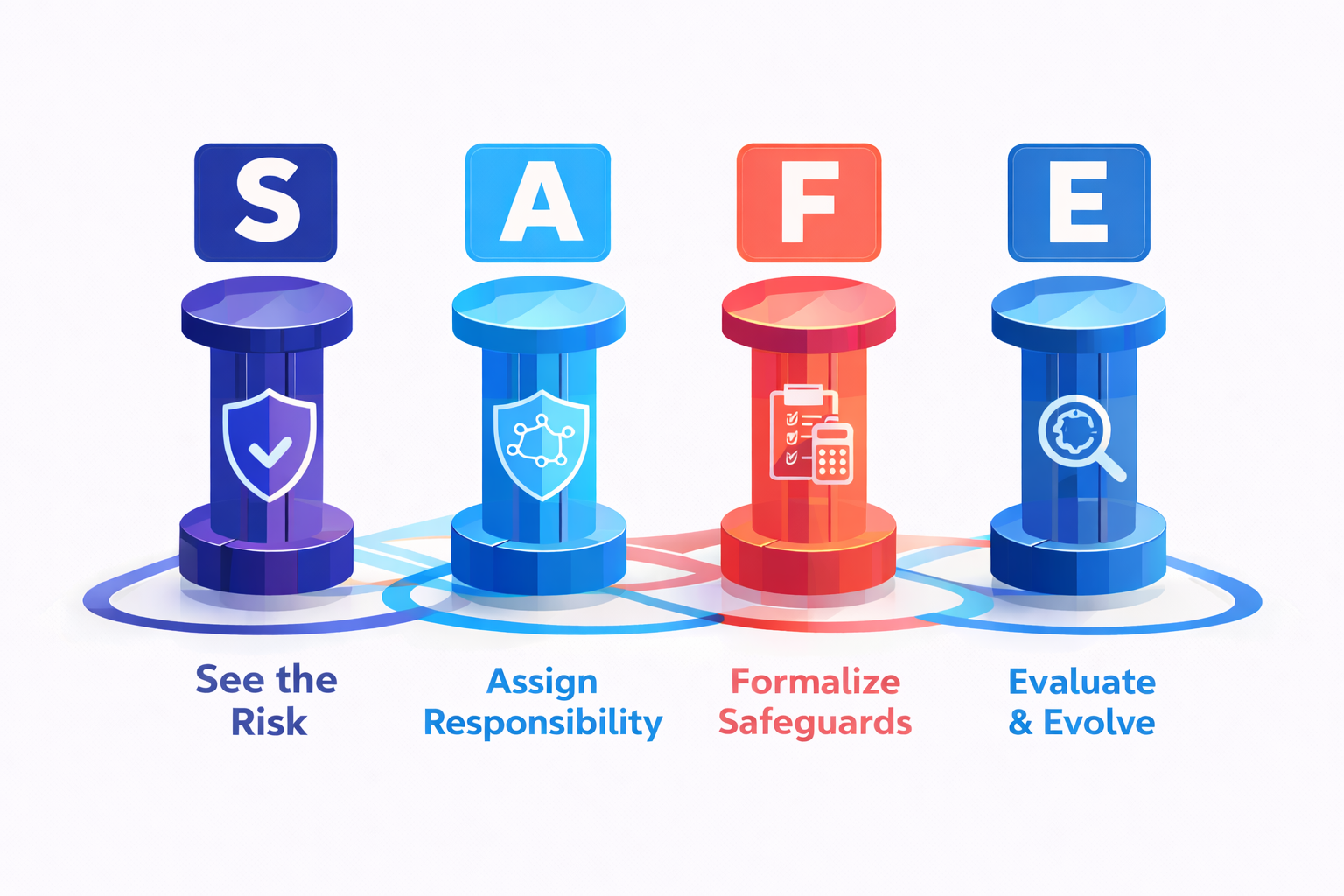
Myla's SAFE Framework™ is a practical way to slow AI adoption down just enough to make it safer:
- See the risk: Know what information, workflow, or patient interaction the AI tool may affect.
- Assign responsibility: Decide who approves tools, manages access, and reviews outputs.
- Formalize safeguards: Put policies, agreements, settings, and education in place.
- Evaluate and evolve: Review tools regularly as features, vendors, laws, and practice needs change.
That last point matters. AI tools change quickly. A tool that was low-risk last year may add new features, new integrations, or new data-sharing options this year. Set it and forget it is great for slow cookers. It is not a great AI governance strategy.
Quick checklist before saying yes to an AI tool
Use these questions before approving AI in your dental practice:
- What problem are we trying to solve?
- What type of information will the tool process?
- Will patient or staff information be entered, uploaded, recorded, stored, or summarized?
- Is customer data used for model training or product improvement?
- Can training on our data be turned off?
- Where is the data stored and processed?
- Who can access the information, including vendors and subprocessors?
- What agreements, privacy terms, and breach notification terms are in place?
- Who on our team is allowed to use the tool?
- What tasks are approved and not approved?
- How will outputs be checked before use?
- Has the team received practical AI, privacy, and cybersecurity education?
If you cannot answer these questions yet, that does not mean AI is off the table. It means the practice is not ready to put the tool into regular use. That is a planning issue, not a panic issue.
Frequently asked questions
Can a dental practice use AI?
Yes, but the practice should assess the tool, the data involved, privacy obligations, security settings, vendor terms, staff access, and how outputs will be reviewed. The answer depends on the tool, the use case, the jurisdiction, and the type of information involved.
Is Canadian data residency required for every AI tool?
Not always under federal private-sector privacy law, but data location still matters. The OPC says organizations remain accountable for personal information transferred to third parties for processing and must provide a comparable level of protection. Some provinces, contracts, regulators, insurers, or organizational policies may impose additional requirements. Get legal or privacy advice for your specific situation. [4]
Can staff use free AI tools for dental work?
Not without practice approval. Free or consumer AI tools may have different privacy, security, retention, training, and account controls than business or healthcare-ready tools. Staff should know which tools are approved and what information must not be entered.
What is the biggest AI mistake dental teams make?
One common mistake is treating AI like a harmless search box. AI tools may store, process, analyze, or use information in ways the user does not expect. The risk often starts with a well-meaning staff member trying to save time. Practical education helps turn good intentions into safer habits.
Does AI education replace legal advice or a privacy impact assessment?
No. AI education helps staff and leaders understand the issues, ask better questions, and use AI more safely. Legal advice, privacy impact assessments, and regulator-specific requirements may still be needed depending on the tool and use case.
Final thought
AI is not something dental practices need to fear. It is something they need to understand.
Used thoughtfully, AI may support better workflows and reduce administrative strain. Used casually, it can create privacy, security, accuracy, and accountability problems that would otherwise be completely avoidable.
The best next step is not to panic. It is to have adequate preparation.
Want a practical place to start? Explore Myla's recommended AI, privacy and cybersecurity education for dental teams and give your team clear, dental-specific support for using AI more safely, confidently, and responsibly.
Learn More. Worry Less. Stay Safe.™
Train Your Team to Spot AI Risks Today