
Fake Dental Supply Invoices: Spot the Scam Before It Costs Your Practice
Jun 19, 2026
It is 10:47 a.m. at the front desk.
A patient, who has just been seen, is making a payment and booking his next appointment. The hygienist is asking for the chart for her upcoming 11 a.m. patient. The phone is ringing again. An assistant just left a note on the receptionist’s desk, mentioning they’re running low on small gloves.
Then an email pops up in the inbox.
It looks normal enough: an invoice for dental supplies from a familiar-sounding company name, a balance due, and a note claiming that payment is required immediately to avoid disruption. The supplies listed in the invoice seem fairly common.
The problem?
The assistant in charge of ordering does not recall sourcing anything from that company in the past couple of months.
On closer look, the team notices that the sender’s email is not even from the supply company’s domain. It is something like “[email protected]” or similar.
This is a perfect example of how fake dental supply invoices work. They do not need to look extraordinary, come from a wildly unusual company name, or demand an exorbitant amount. They just need to look boring enough to avoid scrutiny on a busy day.
If your team is already learning how to recognize real-world dental office cyber risks, Myla’s article on what to look for in dental cybersecurity training is a useful companion resource.
What the scam looks like
A fake dental supply invoice is a false billing scam aimed at getting a business to pay for goods or services that were not ordered, received, or approved.
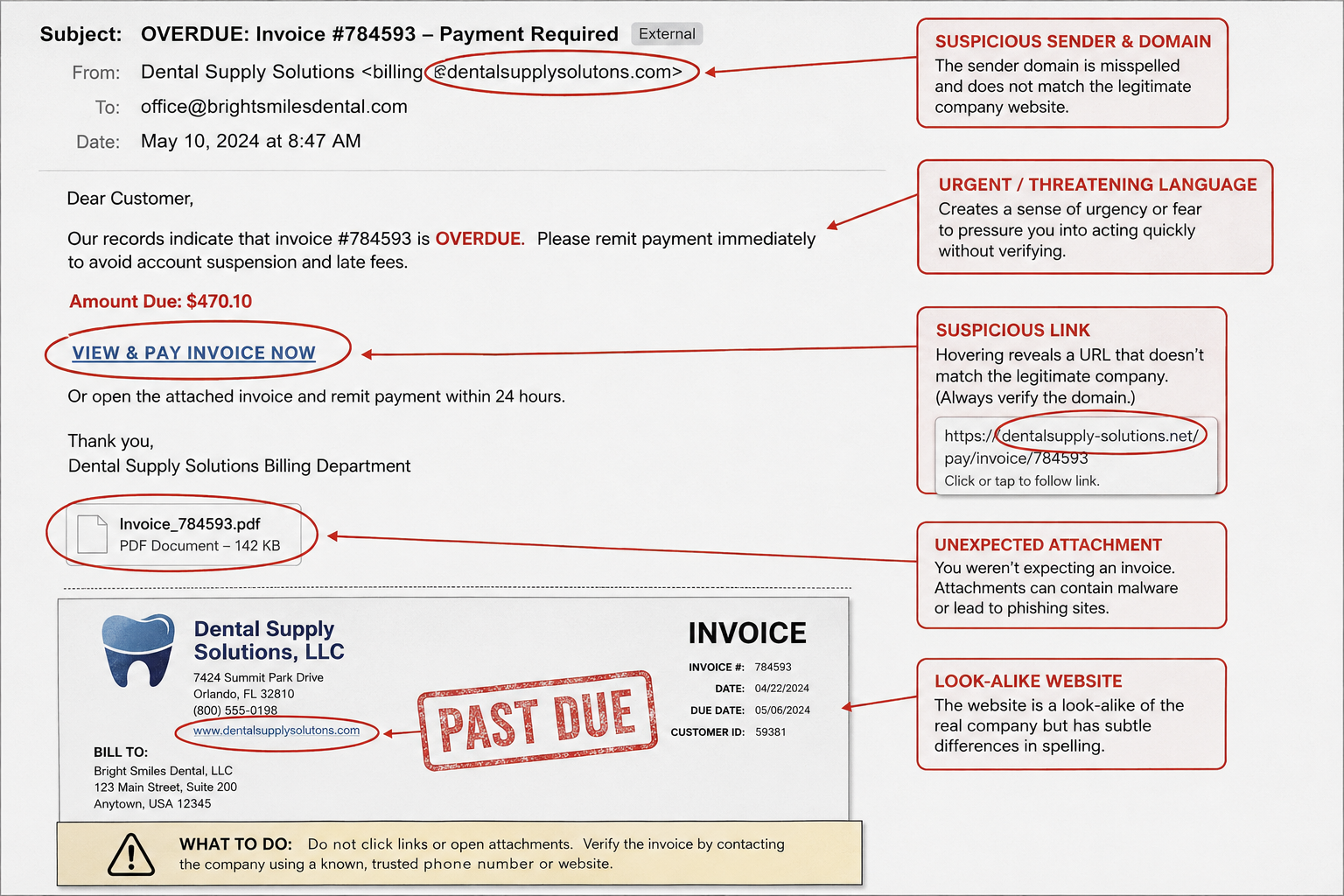
The Canadian Anti-Fraud Centre describes false billing as the “receipt of an unsolicited invoice and demand for payment,” including situations where no product or service was requested.¹ That short definition is a good fit for the kind of average-looking invoice that can slip by without proper scrutiny in a busy dental office.
The fake invoice may look like it came from:
- a dental supply company
- a sterilization or infection-control supplier
- a PPE or glove vendor
- a lab or equipment service provider
- a software, directory, or renewal service
- a company name that appears similar to a real vendor
False billing scams can target businesses through mail, email, text, or phone, and the Canadian Anti-Fraud Centre lists “office supplies” as one common source of false billing.¹
The FTC warns that scammers send fake invoices to small businesses for products or services the business never ordered, hoping the person handling bills will pay.² In the FTC’s words, scammers “send fake invoices to businesses for products or services they never ordered.”²
A fake dental supply invoice might say:
- “Past due — final notice”
- “Payment required to avoid supply hold”
- “Updated remittance details”
- “Please process today”
- “Your team confirmed this order by phone”
- “Statement attached”
- “Click here to view invoice”
- “Payment details updated”
The FBI warns that business-email scams can involve payment and purchase requests that appear legitimate, and it recommends verifying these requests, as well as any demands for changing or updating payment information, before taking action.³
Why dental practices are targeted
Dental practices are busy businesses with frequent purchasing activity, recurring vendors, patient-care urgency, and multiple team members handling administrative work.
That does not mean the team is “okay” to be careless.
It means the workflow is busy, and, hence, the practice needs a calm, repeatable way to stay alert to scams.
Fake invoice scams rely on ordinary business routines: confirming details, sending a bill, applying pressure, and hoping someone pays before double-checking.¹
The FTC says some fake invoices arrive with a “past due” notice, which adds confusion and urgency to a request that may already look routine.² Some fake invoices may also be phishing attempts designed to access business data or network access.²
CISA explains that phishing can involve harmful links, fake emails, and malicious attachments that expose sensitive information or install malware.⁴ That is why a fake invoice is not only an accounting issue. If the invoice includes a malicious link or attachment, it may also become a cybersecurity or privacy issue.
Dental practices may hold personal information or health information, and privacy/security obligations can apply depending on jurisdiction. PIPEDA includes safeguard expectations for personal information in many Canadian private-sector contexts, Ontario’s PHIPA governs personal health information in Ontario health care settings, and the HIPAA Security Rule applies to electronic protected health information for HIPAA-regulated entities in the U.S.⁵⁶⁷
For teams that want a simple way to build this habit before the next suspicious invoice lands, Myla’s Cybersecurity Essentials for Dental Teams is a natural next step. It is designed specifically for dental teams and focuses on everyday habits that help prevent real-world risks, with no IT background needed.
Red flags checklist
Use this checklist before paying an invoice that feels even slightly off.
Invoice red flags
- The vendor name is almost right, but not quite.
- The invoice lists generic products instead of specific items your team ordered.
- The price, tax, shipping, account number, or payment terms do not match past invoices.
- The invoice says “final notice,” but there were no earlier notices.
- The sender asks for urgent payment or threatens supply disruption.
- The remittance address, banking details, or payment portal “has changed.”
- The invoice includes a link or attachment you were not expecting.
- The order was “confirmed by phone,” but no one can identify who approved it.
- The company is not in your approved vendor list.
- The message bypasses your normal ordering or approval process.
The FBI recommends being especially wary if a requestor is pressing for quick action, and it recommends verifying payment and purchase requests by calling the person or verifying in person where possible.³
Email red flags
- The display name looks familiar, but the email address is different.
- The domain has an extra letter, missing letter, or odd ending.
- The message asks you to click a payment link instead of using the usual vendor portal.
- The attachment name is vague, such as “invoice,” “statement,” or “document.”
- The message asks for login credentials, banking details, or one-time passcodes.
CISA advises employee phishing training because phishing can trick staff into clicking harmful links, opening fake emails, or downloading malicious attachments.⁴
What the team should do
1. Pause the payment
Do not pay a suspicious invoice just because it is marked urgent.
The safest first move is a calm pause. The FTC recommends that small businesses “check all invoices closely” and make approval procedures clear for purchases and invoices from vendors the business actually works with.²
Team phrase:
“Before we process this, I’m going to verify it through our normal vendor process.”
2. Compare it to the vendor file
Check the invoice against your approved vendor list and past invoices.
Look at:
- vendor name
- account number
- mailing address
- email domain
- phone number
- product descriptions
- payment terms
- banking or remittance information
- purchase order or approval record
If anything changed, do not use the contact details on the suspicious invoice to verify the change.
The FTC advises people to contact a company using a phone number or website they know is real, not the information in a suspicious message.⁸
3. Verify out-of-band
Out-of-band means using a separate trusted channel.
Call the vendor using the phone number already saved in your vendor file, not the number on the invoice. Log in through the vendor portal you normally use, not through a link in the email.
The FBI recommends verifying changes in account numbers or payment procedures with the person making the request.³
Team phrase:
“We verify payment changes using the contact information already on file.”
4. Ask who approved the order
Every dental practice should know who can approve supply purchases and who can approve payment.
Ask:
- Who ordered this?
- When was it ordered?
- Was there a purchase order?
- Did the product arrive?
- Was it received and checked?
- Is this vendor approved?
- Does the amount match the expected order?
The FTC recommends clear procedures for approving purchases and invoices from vendors the business actually works with.²
If no one can answer, the invoice waits.
5. Escalate without blame
A suspicious invoice should go to the practice manager, owner dentist, designated billing lead, IT provider, privacy/security lead, or the internal person named in your office process.
This is not complicated.
It is teamwork.
CISA recommends training staff to recognize and report phishing scams that could threaten the business.⁴
Team phrase:
“I’m escalating this because it does not match our usual process.”
6. Document what happened
Keep a simple record:
- date received
- sender name and email address
- invoice number
- amount requested
- products listed
- payment method requested
- who reviewed it
- how it was verified
- final decision
- screenshots or copies
If money was sent or information was shared, preserve records and follow your incident response process. The Canadian Anti-Fraud Centre advises fraud victims to gather documents, receipts, and copies of emails or text messages.⁹
7. Report when needed
If the practice paid a fake invoice, contact the financial institution as soon as possible.
The Canadian Anti-Fraud Centre advises fraud victims to contact the financial institution that transferred the money, contact local police, and gather records.⁹
In Canada, cybercrime and fraud can also be reported through the national reporting system developed by the RCMP with the Canadian Anti-Fraud Centre.¹⁰
In the U.S., the FBI directs victims of business email compromise to report to the FBI’s Internet Crime Complaint Center and recommends contacting the financial institution immediately if funds were transferred.³
For a structured training option, see Cybersecurity Essentials for Dental Teams.
What not to do
Do not:
- Pay because the invoice says “urgent.”
- Click the payment link to “check if it is real.”
- Open unexpected attachments from unknown or unverified senders.
- Call the phone number printed on the suspicious invoice.
- Reply with “Did we order this?” to the suspicious sender.
- Update banking details based on an email alone.
- Assume a familiar-looking logo means the invoice is real.
- Blame the person who noticed it.
- Ignore it if someone clicked, replied, paid, or downloaded the attachment.
The FTC warns that links and attachments in phishing messages may install harmful malware, and it recommends contacting the company using a known phone number or website instead of the information in the suspicious message.⁸
The DENTAL Scam Decoder™ takeaway
When a supply invoice feels off, use DENTAL:
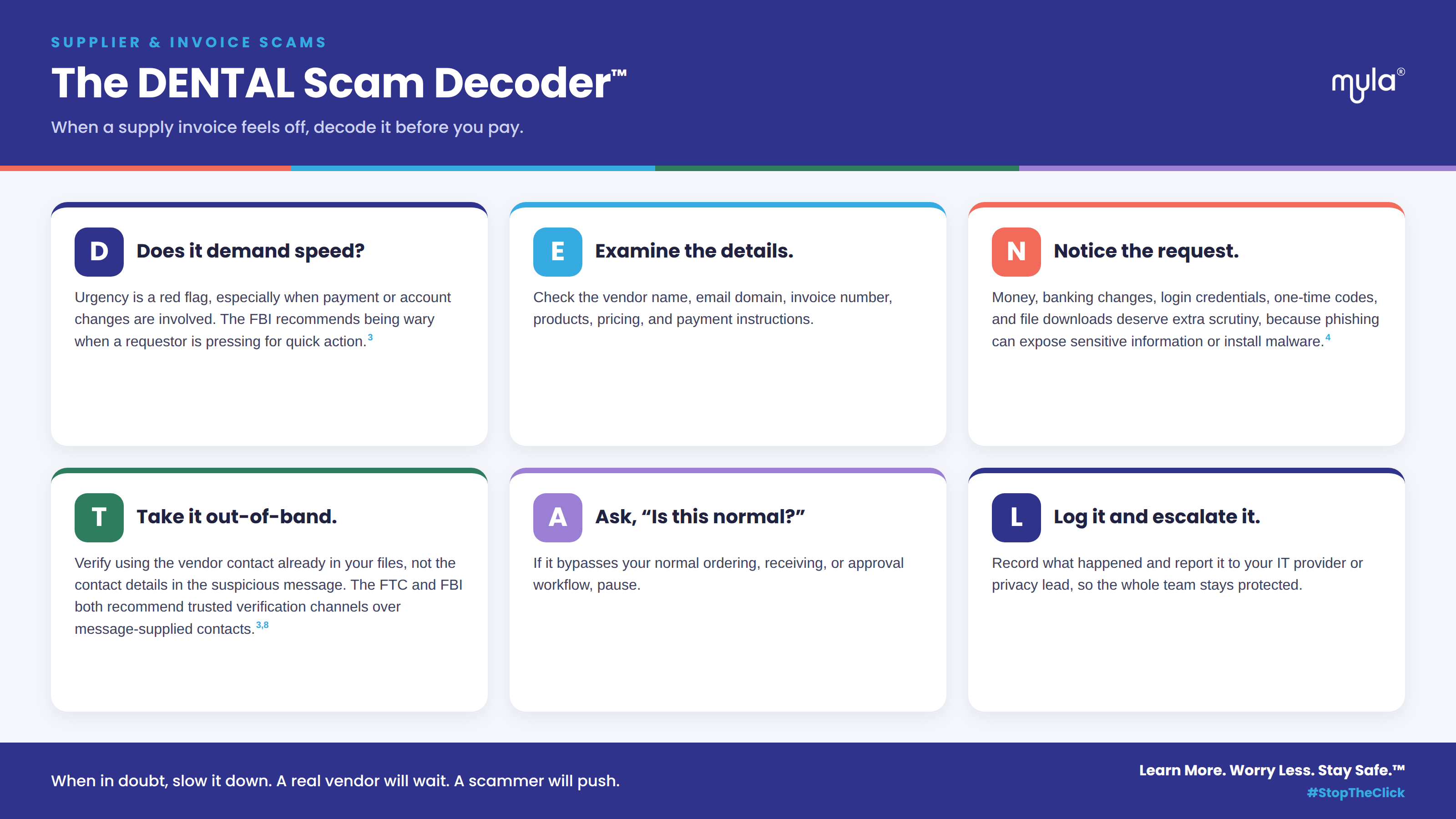
A fake invoice does not need to fool the whole practice.
It only needs to reach one busy, distracted person at the wrong moment.
So take these safety actions:
Pause. Verify. Escalate. Document.
For more practical guidance, readers can explore Myla’s Dental Cybersecurity, AI & Privacy Insights or visit the Myla Training Hub.
FAQ
1. How can a dental team tell if a supply invoice is fake?
Compare the invoice to your approved vendor list, past invoices, purchase records, receiving records, and normal payment process. Red flags include urgent payment language, unfamiliar vendor names, changed banking details, generic product descriptions, unexpected attachments, and links to unfamiliar payment portals.
The FBI recommends verifying payment and purchase requests through trusted channels, especially when the request is urgent or payment details have changed.³
2. Should we call the phone number on the invoice?
No. Use the phone number already saved in your vendor file or log in through the vendor portal you normally use.
The FTC recommends contacting a company using a phone number or website you know is real, not the contact information provided in a suspicious message.⁸
3. What if someone already paid a fake invoice?
Contact the financial institution as soon as possible, preserve all records, and follow your internal incident response process.
The Canadian Anti-Fraud Centre advises fraud victims to gather documents and contact the financial institution that transferred the money; the FBI also recommends contacting the financial institution immediately if funds were transferred in a business email compromise incident.⁹³
4. What if the fake invoice included an attachment?
Do not open it again. Preserve the message and escalate to your IT or security contact.
CISA warns that phishing can involve harmful links, fake emails, and malicious attachments that expose sensitive information or install malware.⁴
5. Is a fake invoice a privacy issue?
It can be, depending on what happened. If the invoice scam led someone to share patient information, credentials, or access to systems containing health information, privacy and breach-response obligations may apply depending on jurisdiction.
PIPEDA includes safeguard expectations for personal information, Ontario’s PHIPA governs personal health information for Ontario health information custodians, and HIPAA-regulated entities must protect electronic protected health information under the Security Rule.⁵⁶⁷
Fake invoices are not just an accounting issue. They are a team workflow issue.
Myla Training Corp helps dental practices build practical, blame-free training for real office moments: suspicious invoices, payment-change emails, remote-access requests, patient information requests, and vendor calls.
Start with Cybersecurity Essentials for Dental Teams, explore all Myla Essentials training, or book a call with Anne to talk about what your team needs next.
Bring the DENTAL Scam Decoder™ into your next team meeting and give your practice simple scripts, checklists, and verification steps your team can use right away.
References
- Canadian Anti-Fraud Centre — False billing
Used for: false billing definition, unsolicited invoice language, office supplies example, business-targeting channels, and fake supply-invoice context. - Federal Trade Commission — Run a small business? Pay your bills, not scammers
Used for: fake invoice scams targeting small businesses, invoices for unordered products/services, past-due urgency, fake invoices as phishing attempts, and invoice approval procedures. - FBI — Business Email Compromise
Used for: business email compromise, payment and purchase request verification, payment-procedure changes, urgency warnings, and IC3 reporting guidance. - CISA — Teach Employees to Avoid Phishing
Used for: phishing training, harmful links, fake emails, malicious attachments, sensitive information exposure, malware installation, and reporting culture. - Office of the Privacy Commissioner of Canada — PIPEDA Fair Information Principle 7: Safeguards
Used for: safeguard expectations for personal information, including physical, technological, and organizational safeguards. - Information and Privacy Commissioner of Ontario — Health privacy in Ontario and Ontario PHIPA statute
Used for: Ontario PHIPA context, personal health information, and collection/use/disclosure framing. - U.S. Department of Health & Human Services — HIPAA Security Rule
Used for: HIPAA Security Rule safeguards for electronic protected health information. - Federal Trade Commission — How to Recognize and Avoid Phishing Scams
Used for: contacting companies through known phone numbers or websites, avoiding suspicious-message contact details, and malware risks from links/attachments. - Canadian Anti-Fraud Centre — What to do if you’re a victim of fraud
Used for: gathering records, contacting financial institutions, contacting police, and victim response steps. - RCMP — Report cybercrime and fraud
Used for: Canadian national cybercrime and fraud reporting route.
Train Your Team to Spot AI Risks Today